
Introduction
You place an order online. The confirmation email arrives instantly. Then you see the message:
“Your order will ship within 1–2 business days.”
At first glance, it sounds simple. But then the questions start creeping in.
Does that include today?
What about weekends?
What if you order on Friday night?
Is it the same for banks, shipping companies, and government offices?
If you’ve ever waited for a package, a bank transfer, or a document approval, you’ve probably wondered what 1–2 business days actually means in real life.
The truth is that business-day timelines are one of the most misunderstood parts of modern commerce. Companies use them everywhere — shipping estimates, payment processing, customer support responses, loan approvals, and more. Yet most people interpret them incorrectly.
This guide will clear up all the confusion.
In this in-depth article, you’ll learn:
- Exactly what 1–2 business days means
- How business days are calculated
- When the clock actually starts
- Real-world examples for shipping, banking, and services
- Common mistakes people make when counting business days
- Tools and methods to calculate timelines correctly
- Practical tips to avoid delays
By the end, you’ll understand business-day timelines the way professionals in logistics, banking, and operations do.
Let’s start with the basics.
What Is 1–2 Business Days? (Simple Explanation)

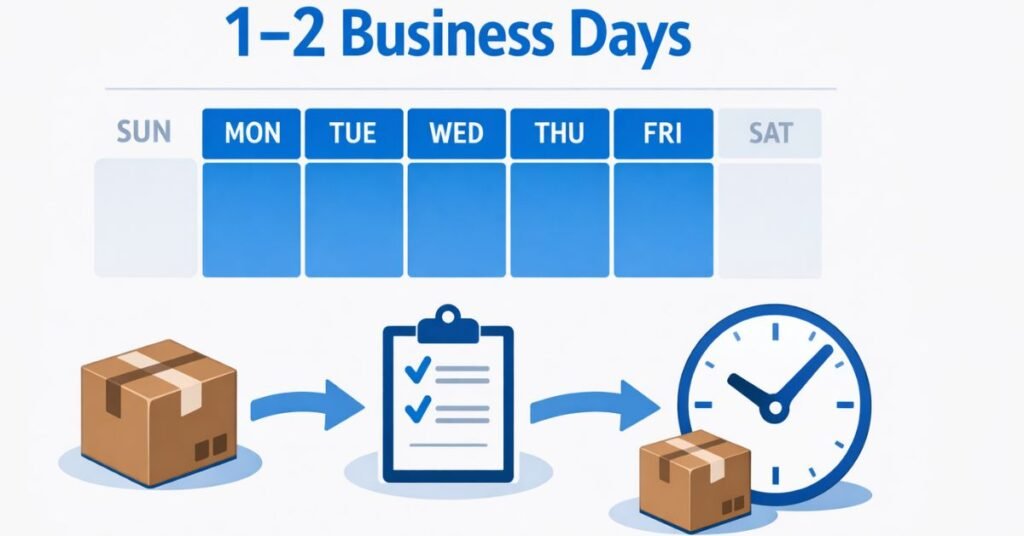
The phrase “1–2 business days” means that something will happen within one or two working days, excluding weekends and public holidays.
In most countries, including the United States, Canada, the United Kingdom, and many others, business days are defined as Monday through Friday during normal working hours.
That means:
- Saturday = not a business day
- Sunday = not a business day
- Public holidays = usually not a business day
So when a company says 1–2 business days, they are promising the task will be completed within one or two working days after the request is processed.
Quick Example
Imagine you order something online:
| Order Day | Business Day Count |
|---|---|
| Monday | Day 0 |
| Tuesday | 1 business day |
| Wednesday | 2 business days |
In this case, shipping would occur by Wednesday.
Another Example
Let’s say you order on Friday afternoon.
| Day | Status |
|---|---|
| Friday | Day 0 (processing) |
| Saturday | Weekend (ignored) |
| Sunday | Weekend (ignored) |
| Monday | 1 business day |
| Tuesday | 2 business days |
Your order would likely ship by Tuesday.
The Key Rule
When companies say 1–2 business days, they typically mean:
- Processing begins the next business day
- Weekends do not count
- Holidays do not count
Why Businesses Use This Language
Companies prefer business-day timelines because they operate only during working hours. Warehouses, banks, customer support teams, and logistics companies generally process transactions Monday through Friday.
Using calendar days would create unrealistic expectations.
For example:
If a company promised “2 days” and you ordered on Friday night, customers would expect Sunday delivery — which most operations cannot support.
That’s why business-day timing protects both businesses and customers from misunderstandings.
Understanding Business Days vs Calendar Days
Many delays happen because people confuse business days with calendar days.
Understanding the difference is crucial when dealing with:
- shipping timelines
- financial transactions
- contract deadlines
- customer service responses
Calendar Days
Calendar days include every single day on the calendar, including:
- weekends
- holidays
- non-working days
If something takes 2 calendar days, the count is continuous.
Example:
Order Monday → Delivered Wednesday.
Business Days
Business days only include working days.
Typical business week:
- Monday
- Tuesday
- Wednesday
- Thursday
- Friday
Excluded days:
- Saturday
- Sunday
- public holidays
Comparison Example
Imagine an order placed Thursday evening.
Calendar day timeline:
| Day | Count |
|---|---|
| Friday | Day 1 |
| Saturday | Day 2 |
Delivery = Saturday.
Business day timeline:
| Day | Count |
|---|---|
| Friday | Day 1 |
| Saturday | Weekend |
| Sunday | Weekend |
| Monday | Day 2 |
Delivery = Monday.
This difference can easily add 2–3 extra days.
Why Businesses Use Business Days
Industries that rely on human processing use business days because operations are limited to working hours.
Examples include:
- banks
- government offices
- shipping warehouses
- accounting departments
- customer support centers
Important Detail Most People Miss
Business-day calculations often start the next day, not the same day.
For example:
If you place an order Monday evening, processing may begin Tuesday morning, making Tuesday the first business day.
Understanding this small detail explains many “unexpected” delays.
Why Businesses Use the 1–2 Business Day Timeline
You’ll see the phrase 1–2 business days everywhere — from ecommerce checkout pages to banking notifications and support emails.
But this isn’t just random wording. It’s a carefully chosen timeline used by operations teams, logistics managers, and customer experience departments.
There are several reasons businesses rely on this specific timeframe.
1. It Creates a Realistic Processing Window
Most companies need time to process requests before fulfillment happens.
For example, when you place an online order, several things occur behind the scenes:
- payment authorization
- fraud screening
- inventory verification
- picking items from the warehouse
- packaging
- labeling
- dispatch scheduling
Even efficient warehouses need several hours to a full working day to complete this process.
A 1–2 business day window allows companies to manage this workflow without promising unrealistic speeds.
2. It Helps Manage High Order Volumes
During busy periods — especially holidays or sales — businesses may receive thousands of orders daily.
The 1–2 business day buffer helps companies handle:
- peak traffic
- supply chain fluctuations
- staffing limitations
- warehouse capacity
Without this buffer, delays would happen constantly.
3. It Protects Customer Expectations
Clear timelines reduce customer frustration.
If companies promised same-day processing, customers would expect immediate action even during:
- weekends
- holidays
- late-night orders
The business-day framework helps set accurate expectations.
4. It Aligns with Financial Processing Systems
Banks and payment processors operate on business-day cycles.
Transactions like:
- ACH transfers
- credit card settlements
- refunds
- payroll deposits
often require 1–2 business days to finalize.
Companies align their timelines with these systems.
5. It Allows Operational Flexibility
Unexpected issues can happen in any business operation:
- inventory discrepancies
- shipping delays
- system outages
- payment verification
A 1–2 day window provides enough flexibility to handle these situations without missing promised deadlines.
In short, business-day timelines are about operational realism, not delay tactics.
Real-World Examples of 1–2 Business Day Processing
To truly understand what 1–2 business days means, it helps to look at real situations where this timeline appears.
Ecommerce Order Processing
When you order products online, 1–2 business days usually refers to processing time before shipping.
Example workflow:
- Order placed Monday evening
- Order processed Tuesday morning
- Item packaged Tuesday afternoon
- Shipment sent Wednesday
The delivery time then depends on the shipping method.
So 1–2 business days = preparation time, not delivery time.
Bank Transfers
Many bank transfers operate on business-day settlement cycles.
Examples include:
- ACH transfers
- account verifications
- wire approvals
- deposit clearing
Example:
Transfer initiated Thursday.
| Day | Status |
|---|---|
| Friday | 1 business day |
| Saturday | ignored |
| Sunday | ignored |
| Monday | 2 business days |
Funds available Monday.
Customer Support Responses
Support teams often promise responses within 1–2 business days.
This allows them to:
- investigate issues
- review accounts
- escalate cases if needed
Example:
Support ticket submitted Friday afternoon.
Response likely arrives Monday or Tuesday.
Document Processing
Government agencies and legal offices often use business-day timelines.
Examples:
- permit approvals
- background checks
- document verification
- employment processing
These systems operate strictly during weekday working hours.
Refund Processing
Refunds frequently require 1–2 business days for approval and processing before funds appear in your account.
The timeline typically includes:
- refund authorization
- payment processor handling
- bank settlement
Each step may occur during business hours only.
Step-by-Step Guide: How to Calculate 1–2 Business Days Correctly
One of the most useful skills when dealing with deadlines is knowing how to count business days accurately.
Here is a simple process professionals use.
Step 1: Identify the Starting Point
The first step is determining when the clock begins.
Often the countdown starts:
- after the order is placed
- after payment confirmation
- after verification
- the next business day
Always check the fine print.
Example:
Order placed Monday night → processing begins Tuesday.
Step 2: Ignore Weekends
When counting business days, skip:
- Saturday
- Sunday
These days never count unless the company explicitly states otherwise.
Step 3: Skip Public Holidays
National holidays pause business-day calculations.
Examples include:
- New Year’s Day
- Independence Day
- Christmas
- national bank holidays
If a holiday occurs during the timeline, it extends the deadline.
Step 4: Count Only Working Days
Start counting from the next valid business day.
Example scenario:
Order placed Thursday evening.
Counting:
- Friday → 1 business day
- Monday → 2 business days
Step 5: Consider Cut-Off Times
Many businesses have daily processing cut-off times, such as:
- 2 PM
- 4 PM
- 5 PM
Orders placed after that time may shift to the next business day.
Example:
Order Monday 6 PM → treated as Tuesday order.
Simple Formula
Business Day Deadline = Start Day + Number of Working Days (excluding weekends and holidays)
Quick Counting Trick
If something takes 2 business days, think of it as two work shifts, not two calendar days.
This mindset helps avoid confusion.
Tools and Methods to Calculate Business Days Easily
While you can count business days manually, professionals often rely on tools to eliminate mistakes — especially when deadlines affect payments, shipping, or legal matters.
Online Business Day Calculators
These tools allow you to input:
- a start date
- number of business days
- holidays (optional)
They instantly calculate the correct deadline.
Popular features include:
- automatic weekend exclusion
- regional holiday calendars
- forward and backward calculations
These tools are extremely useful for project managers, accountants, and ecommerce sellers.
Spreadsheet Formulas
Excel and Google Sheets both support business-day calculations.
For example, Excel includes the function:
WORKDAY(start_date, days)
This formula automatically skips weekends.
Advanced versions also allow custom holiday lists.
Businesses use these formulas for:
- payroll schedules
- contract deadlines
- invoice terms
- project timelines
Project Management Software
Many professional tools include built-in business-day tracking.
Examples:
- task deadlines
- sprint timelines
- service-level agreements (SLAs)
These systems prevent teams from accidentally scheduling work on weekends.
Calendar Apps
Some digital calendars allow you to mark working days only, helping visualize business timelines clearly.
This is especially helpful when coordinating international teams.
Manual Counting (Still Useful)
For simple situations, manual counting works fine.
Just remember the key rules:
- skip weekends
- skip holidays
- confirm cut-off times
Even experienced professionals still use manual counting for quick decisions.
Common Mistakes People Make When Interpreting Business Days
Misunderstanding what 1–2 business days means causes many frustrations — especially with online shopping, banking, and service requests.
Let’s look at the most common mistakes and how to avoid them.
Mistake 1: Counting Weekends
This is the most frequent error.
Many people assume Saturday and Sunday count, but in most industries they do not.
Example mistake:
Order Friday → expect Sunday processing.
Correct expectation:
Order Friday → processed Monday or Tuesday.
Mistake 2: Ignoring Order Cut-Off Times
Orders placed late in the day often start processing the next business day.
Example:
Order Monday 8 PM.
Processing likely begins Tuesday morning.
Mistake 3: Confusing Processing Time with Delivery Time
This is extremely common in ecommerce.
Example message:
“Ships within 1–2 business days.”
Customers often assume delivery will happen within two days.
In reality:
Processing = 1–2 business days
Shipping = additional time
Mistake 4: Forgetting Holidays
Public holidays pause business operations.
If a holiday falls during the timeline, add one extra day.
Example:
If Monday is a holiday:
Tuesday becomes the first business day.
Mistake 5: Assuming All Companies Use the Same Schedule
Different industries may define business days differently.
Examples:
- banks
- government agencies
- international companies
- customer support teams
Some organizations operate six-day business weeks, especially in certain countries.
Mistake 6: Not Checking Time Zones
International services may operate in different time zones.
An order placed late at night locally might already be the next business day for the company.
Understanding these pitfalls can prevent unnecessary frustration.
Practical Tips to Avoid Delays When Dealing with Business-Day Timelines
If you frequently deal with shipping, payments, or service requests, learning how to work around business-day timelines can save you a lot of time.
Here are some professional tips.
Place Orders Early in the Day
Ordering before the company’s cut-off time ensures same-day processing.
Late orders often move to the next business day.
Avoid Friday Evening Requests
Friday night orders almost always delay processing until Monday.
If speed matters, place orders Monday through Thursday.
Check Holiday Calendars
Always review national holidays when expecting time-sensitive deliveries or approvals.
A single holiday can extend timelines by several days.
Use Expedited Services
If you need faster results, many companies offer:
- same-day processing
- priority shipping
- expedited payment clearing
These services bypass normal queues.
Contact Customer Support When Necessary
If a request is urgent, customer support may be able to:
- prioritize your request
- verify processing status
- offer alternative solutions
Plan Around Weekends
Professionals often schedule important tasks earlier in the week to avoid weekend delays.
This is especially common in:
- banking
- legal services
- logistics operations
Smart planning can eliminate most business-day surprises.
Conclusion
Understanding what 1–2 business days means can make a huge difference when dealing with orders, payments, customer service requests, and deadlines.
At its core, the phrase simply refers to one or two working days, typically Monday through Friday, excluding weekends and public holidays. But the real-world application involves more nuance — including processing cut-off times, industry practices, and operational workflows.
Many frustrations arise because people assume business days function the same as calendar days. In reality, they follow the rhythm of professional work schedules. When you factor in weekends, holidays, and processing windows, timelines often stretch longer than expected.
The good news is that once you understand how business days work, predicting timelines becomes much easier. Whether you’re waiting for an online order, a bank transfer, or a customer support response, you can calculate deadlines accurately and avoid unnecessary stress.
Remember these key takeaways:
- Business days usually mean Monday through Friday.
- Weekends and holidays do not count.
- The timeline often starts the next business day.
- Processing time and delivery time are separate stages.
If you regularly deal with shipping, finance, or project deadlines, learning to interpret business-day timelines is a small skill that saves a lot of confusion.
And the next time you see “1–2 business days,” you’ll know exactly what to expect.
FAQs
What does 1–2 business days mean exactly?
It means a task will be completed within one or two working days, typically Monday through Friday, excluding weekends and public holidays.
Does 1–2 business days include weekends?
No. Weekends are usually not considered business days unless a company explicitly states otherwise.
If I order on Friday, when is 1–2 business days?
If you order Friday:
Monday = 1 business day
Tuesday = 2 business days
Processing would likely occur by Tuesday.
Does the day I place the order count as a business day?
Usually not. Many businesses begin counting the next business day, especially if the order is placed after processing hours.
Is 1–2 business days the same as shipping time?
No. It typically refers to processing time before shipping, not the delivery duration.

Michael Grant is a business writer with professional experience in small-business consulting and online entrepreneurship. Over the past decade, he has helped brands improve their digital strategy, customer engagement, and revenue planning. Michael simplifies business concepts and gives readers practical insights they can use immediately.