

If you’ve spent any time online in the last few years, you’ve probably seen surreal, hyper-colorful AI art pop up in social feeds, Discord servers, or even WhatsApp groups. Someone posts a dreamy portrait or a wild fantasy landscape and casually says, “Made this in a few seconds.” More often than not, that tool is Wombo AI.
This article exists because most coverage of wombo ai barely scratches the surface. You’ll find quick reviews, app-store summaries, or hype-driven listicles—but very few resources that explain what it’s actually good at, what it isn’t, and how real people use it without wasting time or expectations.
I’ve used wombo ai in casual creative experiments, quick content mockups, and brainstorming sessions where speed mattered more than pixel-perfect control. I’ve also seen beginners hit walls because they expected it to behave like professional tools. Both experiences matter, and both are usually missing from generic guides.
This guide is written for three types of readers:
People curious about AI art who don’t want technical jargon
Creators who want fast visuals without learning complex software
Marketers and content builders looking for low-friction creative support
By the end, you’ll understand not just how wombo ai works, but when it’s the right choice, when it’s the wrong one, and how to get surprisingly strong results from something that looks deceptively simple.
what is wombo ai and how does it actually work behind the scenes
At its core, wombo ai is an AI-powered art generator designed for speed, accessibility, and fun. Unlike professional generative platforms that overwhelm you with settings, sliders, and model choices, wombo ai strips the process down to its essentials: you type a prompt, pick a style, and the system does the rest.
Think of it like this. Traditional digital art tools are full kitchens. Wombo ai is a food truck. You don’t get endless customization, but you get something flavorful, fast, and consistent.
Behind the scenes, womboAi relies on trained generative models that interpret text prompts and translate them into visual patterns. These models don’t “understand” art the way humans do. Instead, they recognize relationships between words, styles, shapes, and colors based on massive datasets they’ve learned from.
For beginners, the magic is that you don’t need to know any of that. You can type something simple like “a futuristic city at sunset” and get an image that feels intentional rather than random. For more advanced users, the limitation is equally clear: you don’t have fine-grained control over composition, anatomy, or consistency across images.
That trade-off is intentional. Wombo ai was never designed to replace professional tools. It was designed to remove friction—especially on mobile—so creativity feels immediate instead of intimidating.
who benefits most from wombo ai and why it fits their workflow
Wombo ai shines brightest for people who value speed and accessibility over absolute control. If you’ve ever opened a complex design tool and closed it five minutes later because it felt like work instead of creativity, you’re the target user.
Casual creators are the obvious group. People who want to visualize ideas, experiment with concepts, or just enjoy AI art without a learning curve get immediate value. The app feels playful, not technical, which lowers the barrier to entry in a big way.
Content creators and social media managers also benefit, but in a specific way. WomboAi works best for background visuals, abstract concepts, mood boards, and fast post imagery—not polished brand assets. It’s excellent for filling creative gaps when you need something eye-catching right now.
Educators and presenters use it differently. Instead of stock photos, they generate custom visuals that loosely match abstract ideas like “innovation,” “future thinking,” or “digital identity.” These images don’t need perfection—they need vibe.
Where wombo ai struggles is consistency. If you need the same character across ten images or strict brand alignment, you’ll feel boxed in. Understanding that upfront saves frustration.
real-world use cases that actually make sense (and a few that don’t)
One of the biggest mistakes people make with wombo ai is expecting it to solve problems it wasn’t designed for. When used correctly, though, it delivers impressive value.
In brainstorming sessions, wombo ai works like a visual spark. You throw ideas at it quickly and let unexpected outputs trigger new thinking. The results aren’t final—they’re conversation starters.
For indie developers and writers, it’s useful for concept art. You’re not publishing these images, but they help you visualize worlds, characters, or moods while writing or prototyping.
Marketers use it for quick A/B visuals. Instead of spending hours sourcing images, they generate multiple concepts, test engagement, and then invest in higher-quality assets only if something resonates.
Where it doesn’t work well is detailed illustration work, realistic portraits for commercial use, or anything that demands precise control. Treating wombo ai like a sketchpad instead of a finished canvas is the mindset shift most people miss.
how to use wombo ai step by step (with pro-level context)

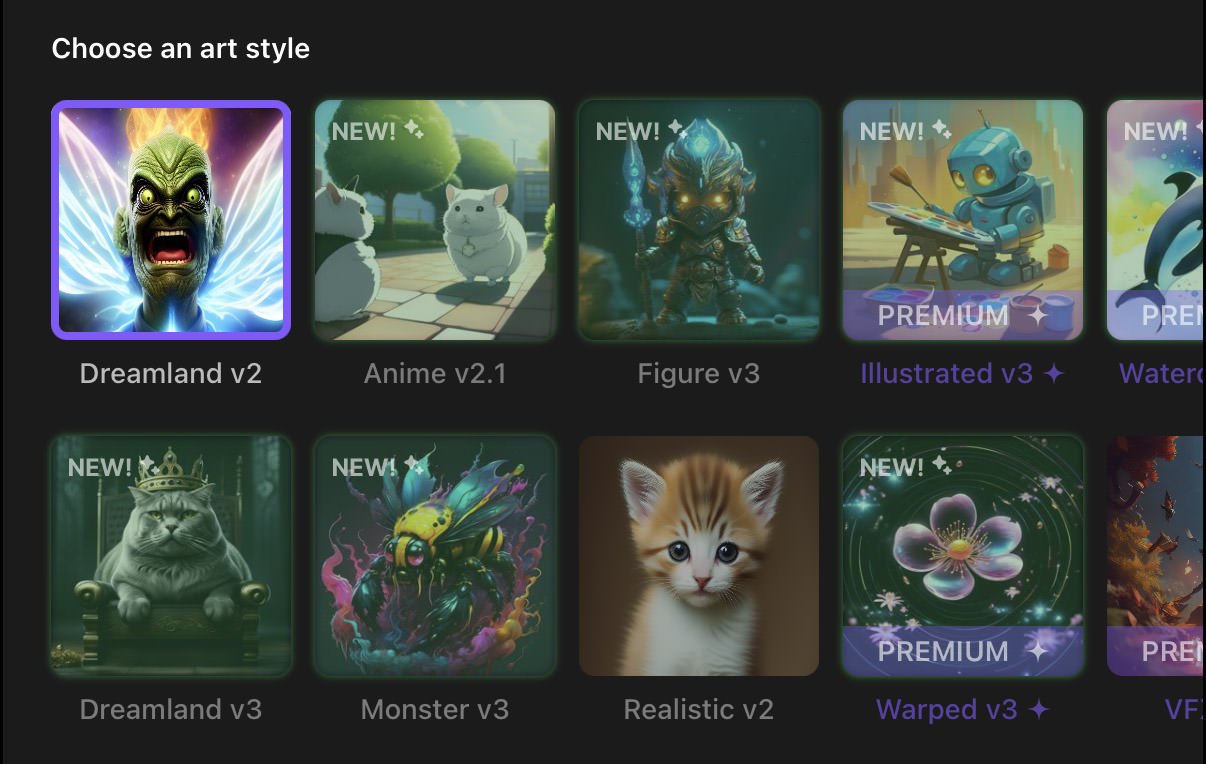

Getting started with wombo ai is deceptively simple, but the quality of your results depends heavily on how you approach each step.
First, the prompt. Short prompts work, but descriptive prompts work better. Instead of “dragon,” try “ancient fire dragon resting on a mountain at dawn, cinematic lighting.” You’re not programming—you’re painting with words.
Second, style selection matters more than people think. Each style biases the output heavily. If your image feels wrong, don’t rewrite the prompt first. Change the style. This alone fixes a surprising number of “bad results.”
Third, iteration is key. The first image is rarely the best. Generate multiple versions quickly, then refine your prompt based on what worked visually.
A practical tip: save prompts that perform well. Wombo ai doesn’t require complex prompt engineering, but small phrasing patterns can dramatically improve consistency.
Finally, know when to stop. Wombo ai rewards speed. If you find yourself chasing perfection, you’re using the wrong tool.
wombo ai vs other ai art tools: honest comparisons from experience



Comparisons matter because expectations matter. Wombo ai often gets unfair criticism because it’s measured against tools built for entirely different audiences.
Compared to Midjourney-style platforms, wombo ai is far less controllable but far more approachable. You don’t need Discord, syntax rules, or trial-and-error frustration. You trade precision for immediacy.
Compared to enterprise-level tools, wombo ai feels lightweight—and that’s the point. It’s built for quick creative output, not production pipelines.
Free vs paid also plays a role. The free version is usable, but paid tiers unlock faster generation and higher output quality. Whether that’s worth it depends on how often you use it. Occasional experimentation? Free is fine. Daily creative support? Paid makes sense.
From an expert perspective, wombo ai works best alongside other tools. Use it early in the creative process, not at the end.
common mistakes people make with wombo ai (and how to avoid them)
One of the most common mistakes is overprompting. People assume more words equal better results, but wombo ai responds better to clear, vivid concepts than technical descriptions.
Another mistake is ignoring style experimentation. Many users blame the prompt when the style is the real issue.
A subtler mistake is expecting originality on demand. AI art reflects patterns it has learned. If your idea is generic, your output will be too. The fix isn’t more prompting—it’s more interesting concepts.
Finally, people underestimate how much context matters. Adding emotional or environmental cues—time of day, mood, atmosphere—often improves results more than adding objects.
where wombo ai fits in a modern creative workflow
Wombo ai isn’t a replacement for designers, artists, or creative software. It’s a multiplier at specific stages.
It works best at the idea stage. When you’re exploring, experimenting, or communicating a concept quickly, it removes friction. Later stages still benefit from human refinement or advanced tools.
In team environments, it’s useful for alignment. Instead of describing an idea abstractly, you generate something visual and let everyone react to the same reference point.
That’s the real value: shared understanding at speed.
conclusion: the right way to think about wombo ai going forward
Wombo ai succeeds because it understands its role. It doesn’t pretend to be everything. It focuses on accessibility, speed, and creative play—and does those exceptionally well.
If you approach it expecting professional-grade control, you’ll be disappointed. If you approach it as a creative accelerator, you’ll be surprised how often it delivers something useful, inspiring, or unexpectedly good.
Used with the right mindset, wombo ai isn’t a toy. It’s a practical tool for modern creators who value momentum over perfection.
FAQs
What is wombo ai best used for?
Wombo ai is best for fast concept art, creative experimentation, social visuals, and brainstorming—not final commercial illustrations.
Is wombo ai free to use?
Yes, wombo ai offers a free version, with optional paid upgrades for faster generation and enhanced output.
Can wombo ai be used for commercial projects?
Usage rights depend on the current terms. Always review licensing before commercial use.
Does wombo ai require prompt engineering?
No. Clear, descriptive language works better than technical syntax.
Is wombo ai good for beginners?
Absolutely. Its simplicity is one of its biggest strengths.

Adrian Cole is a technology researcher and AI content specialist with more than seven years of experience studying automation, machine learning models, and digital innovation. He has worked with multiple tech startups as a consultant, helping them adopt smarter tools and build data-driven systems. Adrian writes simple, clear, and practical explanations of complex tech topics so readers can easily understand the future of AI.





Z szacunkiem i podziwem śledzę twego bloga, uważnie czytam wszystkie posty, to jest dobra i właściwa droga budować dydaktyczne mosty.
Prawdziwy z Ciebie talent i mistrz pióra z ogromną łatwością przekładasz myśli na słowa… trzymaj tak dalej, dbaj i pielęgnuj swego bloga… Czym się inspirujesz na co dzień ? skad czerpiesz pomysły na wpisy ?
References:
Las Vegas Casino Führer https://las-vegasro-casino.online-spielhallen.de
References:
Casino winners https://ahrs.al/punesimi/best-payid-online-pokies-australia-instant-deposits-2026
References:
Legiano Casino Mindestauszahlung go.115.com
References:
Legiano Online Casino http://www.ensembl.org/Help/Permalink?url=https://smartbusinesscards.in/vernitasaragos
References:
Legiano Casino Paysafecard rezkyrizani.xtgem.com
References:
Legiano Casino Video Review http://kisska.net/go.php?url=https://gen.medium.com/r?url=https://de.trustpilot.com/review/der-wikinger-shop.de
References:
Legiano Casino Neukundenbonus https://link.17173.com
References:
Legiano Casino Abzocke http://image.google.ci/url?sa=i&source=web&rct=j&url=https://spd.link/lavernpick
References:
Legiano Casino Spiele http://omga.su/viewer.php?urldocs=https://redirect.camfrog.com/redirect/?url=https://de.trustpilot.com/review/beyondjewellery.de
References:
Legiano Casino Cashback nou-rau.uem.br
References:
Legiano Casino Support http://images.google.co.za/
References:
Legiano Casino Alternative login.bizmanager.yahoo.co.jp
References:
Legiano Casino VIP Programm http://coolbuddy.com/
References:
Legiano Casino Web App http://88.pexeburay.com
References:
Legiano Casino Kritik https://online.ts2009.com/
References:
Legiano Casino http://dreamwar.ru
References:
Legiano Casino Live Casino s0565755c.fastvps-server.com
References:
Legiano Casino Einzahlung https://board-cs.seafight.com/proxy.php?link=https://www.flashback.org/leave.php?u=https://de.trustpilot.com/review/der-wikinger-shop.de
References:
Legiano Casino Promo Code https://encyclopedia2.thefreedictionary.com/_/cite.aspx?url=https://upangmarga.go.id/rachaelwing25&word=LOL&sources=foldoc,cde
References:
Legiano Casino Deutschland https://scienceplus.abes.fr/describe/?url=https://chaturbate.com/external_link/?url=https://de.trustpilot.com/review/beyondjewellery.de
References:
Legiano Casino PayPal http://shop2.myflowert.cafe24.com/member/login.html?returnUrl=https://liy.ke/vickiz5343959
References:
Legiano Casino Promo Code https://piratebooks.ru/proxy.php?link=http://naruminato.xtgem.com/waptool.php?site=de.trustpilot.com/review/der-wikinger-shop.de
References:
Legiano Casino sicher wiki.desmume.org
References:
Legiano Casino Anmeldung https://www.camtomycam.com/external_link/?url=https://de.trustpilot.com/review/edelkranz.de
References:
Legiano Casino VIP Programm https://perevodvsem.ru/
References:
Legiano Casino Support pagekite.net
References:
Legiano Casino Lizenz https://plitkat.ru/
References:
Legiano Casino Kritik xtvendie.xtgem.com
References:
KingMaker neteller https://readserie.com/8lsqh
References:
Kingmaker Casino No Deposit Bonus https://m.2target.net/joellenhar
References:
Kingmaker Casino Betrug 301.tv
References:
Kingmaker casino einzahlung bonus aktivieren https://flowlink.me
References:
KingMaker Casino Einzahlung Spielgeld http://www.google.co.bw/url?sa=t&url=https://de.trustpilot.com/review/beyondjewellery.de/
References:
Kingmaker Casino Strategy http://www.google.pt/url?q=https://de.trustpilot.com/review/beyondjewellery.de
References:
Kingmaker Casino Slots http://images.google.it/url?q=https://de.trustpilot.com/review/beyondjewellery.de
References:
Kingmaker casino paypal einzahlung clients1.google.co.cr
References:
Kingmaker casino kreditkarte einzahlen mcrpk.ru
References:
KingMaker Casino Einzahlung per Handyguthaben http://images.google.co.ck
References:
Legiano Casino Einzahlung http://captcha.2gis.ru/form?return_url=http://telegra.ph/Spiele-Wetten–exklusive-Aktionen-online-06-07-2
References:
Leggiano Casino wbozagi.cafe24.com
References:
Legiano Casino Auszahlung cse.google.pl
References:
Legiano Casino legal http://cse.google.com.tj
References:
Legiano Casino Live Casino http://maps.google.gr
References:
Kingmaker Casino Spiele http://images.google.co.uz/url?source=imgres&ct=img&q=https://jagoan-hosting.online/ellieharford60
References:
KingMaker einzahlung sofortüberweisung https://kpbc.umk.pl/dlibra/login?refUrl=aHR0cHM6Ly9rMXQua3IvcXl1ZGVvbjM3ODUyNTY
References:
Legiano Casino Bonusbedingungen https://www.bookwinx.ru/proxy.php?link=https://telegra.ph/Luxus-Apartment-mit-4-Zimmer-zu-verkaufen-in-Lungomare-Trieste-134-Lignano-Udine-Friaul-Venetien-132645250-06-07
References:
Kingmaker Casino Forum https://4cheat.org/goto/link-confirmation?url=aHR0cHM6Ly9kZTJ3YS5jb20vcG9yZmlyaW9mNDI4ODM
References:
Kingmaker Casino 10 Euro Bonus sites.fastspring.com
References:
Legiano Casino sicher http://clients1.google.bg/
References:
KingMaker Casino Einzahlung per Paysafecard zooshans.by
References:
Legiano Casino Slots http://www.electrik.org/
References:
Kingmaker Casino Gutschein http://clients1.google.co.zw/url?q=https://linknest.vip/kyleteece56226
References:
KingMaker Casino Einzahlung jetzt https://forum.teacode.com/registration.jsp;jsessionid=D579B0F049C6CE59BE64BEFA834A13DB?backurl=http://w09.ru/rory9637348829
References:
Legiano Casino Bonus ohne Einzahlung https://forum.home.pl/
References:
Legiano http://cse.google.com.au
References:
Legiano Casino Codes http://www.google.bt
References:
Kingmaker casino apple pay einzahlung ntsr.info
References:
KingMaker Casino Einzahlung per Lastschrift parrots.ru
References:
Legiano Casino Willkommensbonus ocprof.ru
References:
Monro Casino Review images.google.ru
References:
Hitnspin verifizierung forums.playredfox.com
References:
Hitnspin casino auszahlungsdauer http://images.google.dk/url?sa=t&url=http://cds.zju.edu.cn/addons/cms/go/index.html?url=https://de.trustpilot.com/review/der-wikinger-shop.de
References:
Monro Casino Aktionscode https://kak2z.ru
References:
Hitnspin casino trustpilot https://michael-smirnov.ru/
References:
Hitnspin bewertung http://images.google.ee/
References:
Hitnspin casino download http://www.mejtoft.se/research/?page=redirect&link=https://mcpedl.com/leaving/?url=http://de.trustpilot.com/review/der-wikinger-shop.de
References:
Hitnspin casino no deposit bonus pagecs.net
References:
Hitnspin anmelden http://wiki.desmume.org/api.php?action=https://bowen-michael-4.mdwrite.net/hitnspin-online-casino-spielen-sie-im-besten-casino
References:
Hit n spin bonus ohne einzahlung https://structurizr.com/
References:
Hitnspin casino review fxsklad.ru
References:
Hit n spin casino promo code https://postjung.com
References:
Hit’n’spin casino 25 euro bonus ohne einzahlung
http://www4.ownskin.com/wap_theme_download.oss?t=p406S60h&c=3&h=link.mym.ge/delorasjarvis2
References:
Hit n spin casino promo code https://omnimed.ru/bitrix/redirect.php?event1=&event2=&event3=&goto=https://allbio.link/pauletted6
References:
Hitnspin casino test https://www.musicalion.com/es/scores/notes/composition/get-languages-partial?baseUrl=https://link.epicalorie.shop/soilademaine92
References:
Hit n spin casino app https://r.pokupki21.ru
References:
Hitnspin bonus ohne einzahlung https://digiex.net/
References:
Hitspin casino http://s2.xvatit.com/
References:
Hitnspin casino kundenbewertungen https://www.kxdw.com
References:
Hitnspin casino seriös kaptur.su
References:
Lollybet Casino Gutscheincode http://www.google.ml/url?q=http://maps.google.com.ai/url?q=https://lollybet.com.de/
References:
Lollybet Aktionscode http://images.google.com.tw/url?sa=t&url=http://tubisocial.com/@altonvenegas8?page=about
References:
Lollybet Casino Sicherheit https://www.boxingforum24.com
References:
Lollybet Casino Zahlungsmethoden go.115.com
References:
Hitnspin casino login http://clients1.google.li/url?q=https://www.forum-joyingauto.com/member.php?action=profile&uid=162249
References:
Hitnspin casino no deposit bonus http://clients1.google.ki
References:
Hitnspin casino auszahlungslimit http://59ga.ru/
References:
Hitnspin casino http://cse.google.co.il/
References:
Hit’n’spin casino erfahrungen clients1.google.mw
References:
Hit n spin casino bonus cse.google.tt
References:
Hitnspin kundensupport images.google.co.ug
References:
Hitnspin casino echtgeld http://images.google.co.in
References:
Hit n spin casino http://77.pexeburay.com/index/d2?diff=0&utm_source=og&utm_campaign=20924&utm_content=&utm_clickid=00gocgogswows8g4&aurl=https://www.altamira.edu.ec/profile/alstrupiazhwang95156/profile
References:
Hit n spin bonus ohne einzahlung http://images.google.com.ni/
References:
Hitnspin bewertung http://images.google.com.nf
References:
Hitn spin casino http://maps.google.ba/url?q=https://lassy.ru/user/paintfender05/
References:
Hitnspin app maps.google.gm
References:
Hitnspin auszahlung dauer http://kank.o.oo7.jp/cgi-bin/ys4/rank.cgi?mode=link&id=569&url=https://briefjournal.site/item/casino-bonus-ohne-einzahlung-2026-die-besten-no-deposit-boni
References:
Hitnspin online casino cse.google.al
References:
Online payid pokies https://music.1mm.hk/
References:
Instant payid pokies australia wazifaha.net
References:
Payid online pokies australia https://iraqitube.com/@shaynadesjardi?page=about
References:
Online pokies with payid australia real money worlancer.com
References:
Lollybet APK clients1.google.co.ls
References:
Lollybet Casino Registrierung https://www.safe.zone/login.php?domain=https://sysurl.online/marshamidgett
References:
Lollybet Casino Auszahlung http://old.sibindustry.ru/links/out.asp?url=https://elinks.bio/juliangkw79155
References:
Lollybet Cashback https://93.pexeburay.com/
References:
Lollybet Casino Bewertung google.com.ni
References:
Lollybet Casino Registrierung http://images.google.co.uk/
References:
Lollybet Casino Neukundenbonus https://forum.bestflowers.ru/
References:
Lollybet Casino Betrug http://images.google.bi
References:
Lollybet Casino Mobile https://movdpo.ru/
References:
Lollybet Casino Bitcoin http://www.google.com.ua/url?sa=t&url=https://hhhlink.club/bethmeeker5476
References:
The casino https://collisioncommunity.com/
References:
Slots of vegas casino https://cyberdefenseprofessionals.com/companies/instant-casino-bewertung-instant-casino-2026/
References:
Lollybet Casino Bewertung https://ppeci.com/index.php?URL=https://www.kfz-eske.de/1-000-bonus-slots-schnelle-auszahlung
References:
Lollybet Casino 100 Freispiele http://images.google.sr/url?q=https://www.kfz-eske.de/deine-online-spielothek
References:
Lollybet Online Casino welqum.com
I want to express my appreciation for the writer of this blog post. It’s clear they put a lot of effort and thought into their work, and it shows. From the informative content to the engaging writing style, I thoroughly enjoyed reading it.
Your posts always provide me with a new perspective and encourage me to look at things differently Thank you for broadening my horizons
References:
Lollybet Casino Betrug https://forgejo.rekallservices.com/
References:
Lollybet Casino Bonusbedingungen dreamplacesai.de
References:
Payid pokies instant withdrawal https://www.euromonitor.com/insights/insight-search-result-page-tags?tag=travel&returnUrl=https://instantcasinodeutschland.de/fr-fr/
References:
Online pokies australia payid real money http://coinsplanet.ru/redirect?url=https://instantcasinodeutschland.de/fr-fr/
References:
Erwin Casino Erfahrungen https://chaturbate.com/
References:
Casanova Casino Erfahrungen https://s3.amazonaws.com/new-casino/Zet-Casino-Erfahrungen.html
References:
National Casino Auszahlung http://www.warszawa.lasy.gov.pl
References:
711 Casino Test https://gmerago.com/
References:
Vegas Casino Auszahlung https://atmasangeet.com/
References:
Candy96 official site gladjobs.com
References:
Candy96 register https://adaptsmedia.info/optima/companies/candy96-casino-australia-100-bonus-real-money-pokies-2026
References:
Candy96 live dealer fanajobs.com
References:
First Casino Bewertung http://maps.google.co.zm
References:
Bet365 Casino Bonus ohne Einzahlung https://65.cholteth.com/
References:
Betino Casino Login http://www.google.com.vc/url?sa=t&url=https://forum.thd.vg/proxy.php?link=http://clients1.google.com.nf/url?q=https://instantcasinodeutschland.de
References:
Casinomilyon Auszahlung http://crazyfrag91.free.fr/?URL=http://rr-clan.ru/proxy.php?link=https://instantcasinodeutschland.de/
References:
711 Casino Bonus ohne Einzahlung https://xxx-files.org/
References:
Vegas Casino Online Bonus ohne Einzahlung ww2talk.com
References:
Casinova Einzahlung http://www.degeneratov.net
References:
Intense Casino Auszahlung http://www.rmnt.ru
References:
Neosurf Casino Bonus https://fixbios.com/
References:
Legiano Casino App https://msmt.gov.cz/photo_formats/gaudeamus-png?format=8&retUrl=https://vcard.ticr.app/hyerobb479884
References:
Intense Casino Einzahlung forums-archive.eveonline.com
References:
Db Casino Erfahrungen https://wiki.kubg.edu.ua/api.php?action=https://vcard.ticr.app/emmetty6462808
References:
Legiano Casino Erfahrungen https://mt-travel.ru/bitrix/rk.php?goto=http://tamilachat.org/community/profile/adelaidaschultz/
References:
Da Vinci’s Casino Login https://45.cholteth.com/index/d1?diff=0&utm_source=ogdd&utm_campaign=26607&utm_content=&utm_clickid=g00w000go8sgcg0k&aurl=http://zenithgrs.com/employer/beste-krypto-casinos-2026-im-test-und-vergleich/
References:
Posido Casino Erfahrungen https://www.emlakkulisi.com/reklamlar/ref_haberici_Yonlendir-43_http:/zenithgrs.com/employer/beste-krypto-casinos-2026-im-test-und-vergleich/
References:
Robocat Casino Bonus ohne Einzahlung https://avtobaza2.ru
References:
Intense Casino Auszahlung skyblock.net
References:
Vulkan Casino Bonus ohne Einzahlung https://cm-eu.wargaming.net/
References:
Rolletto Casino Bonus ohne Einzahlung 4cheat.org